

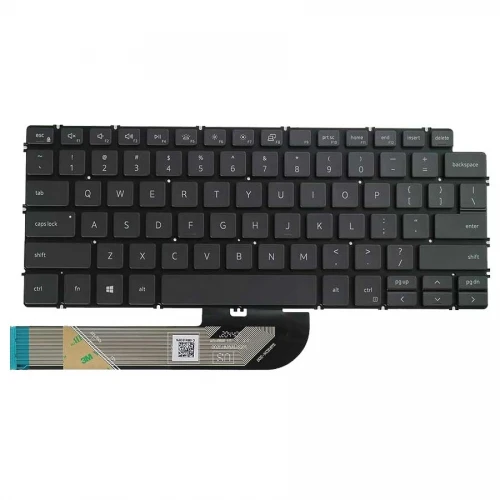
Dell Vostro 3401 Laptop Keyboard
Contact us for pricing
Product Details
Key Features
Model: Vostro
Condition: Brand New
Layout: US
Size: Medium
Compatible with Dell Vostro 3401
Specification
| Layout | US |
| Compatibility | Dell Vostro 3401 |
| Color | Black |
| Warranty | 3-Month Warranty |
Brother HL-L2320D Auto Duplex Laser Printer
The Dell Vostro 3401 laptop keyboard is a brand-new,
precision-engineered replacement component tailored exclusively for the Dell
Vostro series laptop. Dressed in a classic black finish, this keyboard features
a standard US layout that delivers a familiar and efficient typing experience
for everyday tasks—whether you're drafting emails, working on spreadsheets, or
engaging in content creation. Designed with a medium-sized form factor, Dell
Vostro 3401 balances compactness and usability, making it suitable for both
mobile professionals and home users. It’s built without a backlight, track
pointer, or RGB lighting, prioritizing a clean and distraction-free setup ideal
for focused work environments. This minimalist approach not only supports
improved energy efficiency but also aligns with the Vostro line’s reputation
for business-grade simplicity. The Dell Vostro 3401 keyboard comes without
screws or a power switch, which often translates to easier replacement and
streamlined installation—perfect for DIY users or technicians performing
maintenance on the device. Its absence of extra hardware reduces setup
complexity while ensuring a snug and compatible fit within the Dell 3401 frame.
Whether you're replacing a worn-out keyboard or restoring full functionality after
accidental damage, this OEM-compatible unit provides reliable performance,
long-term durability, and seamless integration with the original laptop
hardware. It’s the go-to solution for users who value practicality and
precision without compromising on quality.
How to Order
Revolution Technology BD has made shopping easier for customers. Follow these steps:
- Click Register Button from home page
- Register with: Name + Email + Mobile + Password
- Click Create Account after entering information
- Login automatically or use Login button
- Provide mobile number and password, then Sign Up
- Choose desired product and click Buy Now
- View product details and click Add to Cart
- Click Item box (upper right corner)
- Go to Shopping Cart page
- Continue Shopping for more products or proceed
- Click "Click Here to Address" button
- Provide Full Name, Phone, Email & Delivery Address
- Click Order Submit button
- View Bill Invoice and receive email confirmation
- Print Invoice using Print button
- Wait for delivery - we'll keep you updated
- Thank you for shopping with us!



