
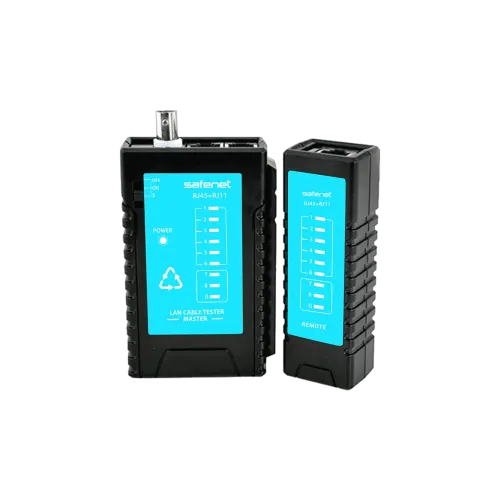
Professional LAN Cable Tester #18-7010BL
Exclusive of all taxes
Product Details
Key Features
Universal Interface Support: Tests Ethernet, Telephone, USB, BNC, VGA, DVI, HDMI and DisplayPort cables with a single device, saving time and tools.
Broad OS Compatibility: Works seamlessly with Windows, Linux, Unix, Mac, Solaris, Redhat and Ubuntu environments, ensuring integration into any lab setup.
Clear Pass LED Indicators: LED lights provide instant visual confirmation of a successful test, reducing guesswork.
Detachable Remote Unit: The remote can be detached for convenient handheld testing in tight spaces or mounted for bench use.
Comprehensive Continuity Testing: Detects continuity, open circuits, shorts and miswiring across all supported cable types.
Portable and Rugged Design: Compact form factor and sturdy construction make it ideal for field technicians and on‑site diagnostics.
Fast Result Display: Instant LED feedback accelerates troubleshooting, minimizing network downtime.
Multi‑Platform Software Support: Compatible drivers and utilities are available for all listed operating systems, enabling automated logging if needed.
Energy Efficient Operation: Low power consumption extends battery life for prolonged field use.
User‑Friendly Interface: Simple button layout and clear indicators make it easy for both beginners and seasoned professionals.
Model | 18-7010BL |
Supported Interfaces | Ethernet, Telephone, USB, BNC, VGA, DVI, HDMI, DisplayPort |
OS Compatibility | Windows, Linux, Unix, Mac, Solaris, Redhat, Ubuntu |
LED Indicators | Clear pass indication |
Remote Control | Detachable remote |
Testing Capabilities | Continuity, open circuits, shorts, miswiring |
Description
Professional LAN Cable Tester #18-7010BL
Key Features & Benefits:
- Universal Interface Support: Tests Ethernet, Telephone, USB, BNC, VGA, DVI, HDMI and DisplayPort cables with a single device, saving time and tools.
- Broad OS Compatibility: Works seamlessly with Windows, Linux, Unix, Mac, Solaris, Redhat and Ubuntu environments, ensuring integration into any lab setup.
- Clear Pass LED Indicators: LED lights provide instant visual confirmation of a successful test, reducing guesswork.
- Detachable Remote Unit: The remote can be detached for convenient handheld testing in tight spaces or mounted for bench use.
- Comprehensive Continuity Testing: Detects continuity, open circuits, shorts and miswiring across all supported cable types.
- Portable and Rugged Design: Compact form factor and sturdy construction make it ideal for field technicians and on‑site diagnostics.
- Fast Result Display: Instant LED feedback accelerates troubleshooting, minimizing network downtime.
- Multi‑Platform Software Support: Compatible drivers and utilities are available for all listed operating systems, enabling automated logging if needed.
- Energy Efficient Operation: Low power consumption extends battery life for prolonged field use.
- User‑Friendly Interface: Simple button layout and clear indicators make it easy for both beginners and seasoned professionals.
Ideal For:
- Network installers verifying cable integrity on new builds
- IT support staff troubleshooting office LAN issues
- Field technicians maintaining telecom infrastructure
- AV professionals testing HDMI and DisplayPort connections
- System integrators ensuring cross‑platform compatibility
- Educational labs teaching cable testing fundamentals
- Data center engineers performing routine cable audits
Summary:
The Professional LAN Cable Tester #18-7010BL from Revolution Technology BD offers comprehensive testing for Ethernet, Telephone, USB, BNC, VGA, DVI, HDMI and DisplayPort cables, with clear LED pass indicators and a detachable remote for flexible use. It supports a wide range of operating systems including Windows, Linux, Unix, Mac, Solaris, Redhat and Ubuntu, making it suitable for any IT environment. Designed for portability and durability, it quickly identifies continuity, open circuits, shorts and miswiring, helping technicians reduce downtime. Available now at Revolution Technology BD for network professionals, AV installers and IT support teams.
How to Order
Revolution Technology BD has made shopping easier for customers. Follow these steps:
- Click Register Button from home page
- Register with: Name + Email + Mobile + Password
- Click Create Account after entering information
- Login automatically or use Login button
- Provide mobile number and password, then Sign Up
- Choose desired product and click Buy Now
- View product details and click Add to Cart
- Click Item box (upper right corner)
- Go to Shopping Cart page
- Continue Shopping for more products or proceed
- Click "Click Here to Address" button
- Provide Full Name, Phone, Email & Delivery Address
- Click Order Submit button
- View Bill Invoice and receive email confirmation
- Print Invoice using Print button
- Wait for delivery - we'll keep you updated
- Thank you for shopping with us!