
Offline vs Online UPS: Which One Does Your Office Actually Need?
If you run an office, shop or clinic in Bangladesh, you already know the routine: the lights flicker, the computers restart, and somebody loses an hour of unsaved work. A UPS (uninterruptible power supply) fixes that, but buying one is confusing. Do you need an offline UPS or an online UPS? Is a bigger number always better? And why does a "1200VA" UPS not run 1200 watts of equipment?
This guide answers those questions in plain language and ends with a simple buying table. You can browse every option in the Revolution Technology product range as you read.
What a UPS actually does
A UPS sits between the wall socket and your equipment. When mains power drops, spikes or disappears, its battery takes over so your devices keep running long enough to save work and shut down safely, or to ride out a short outage. The real difference between UPS types is how they do this.
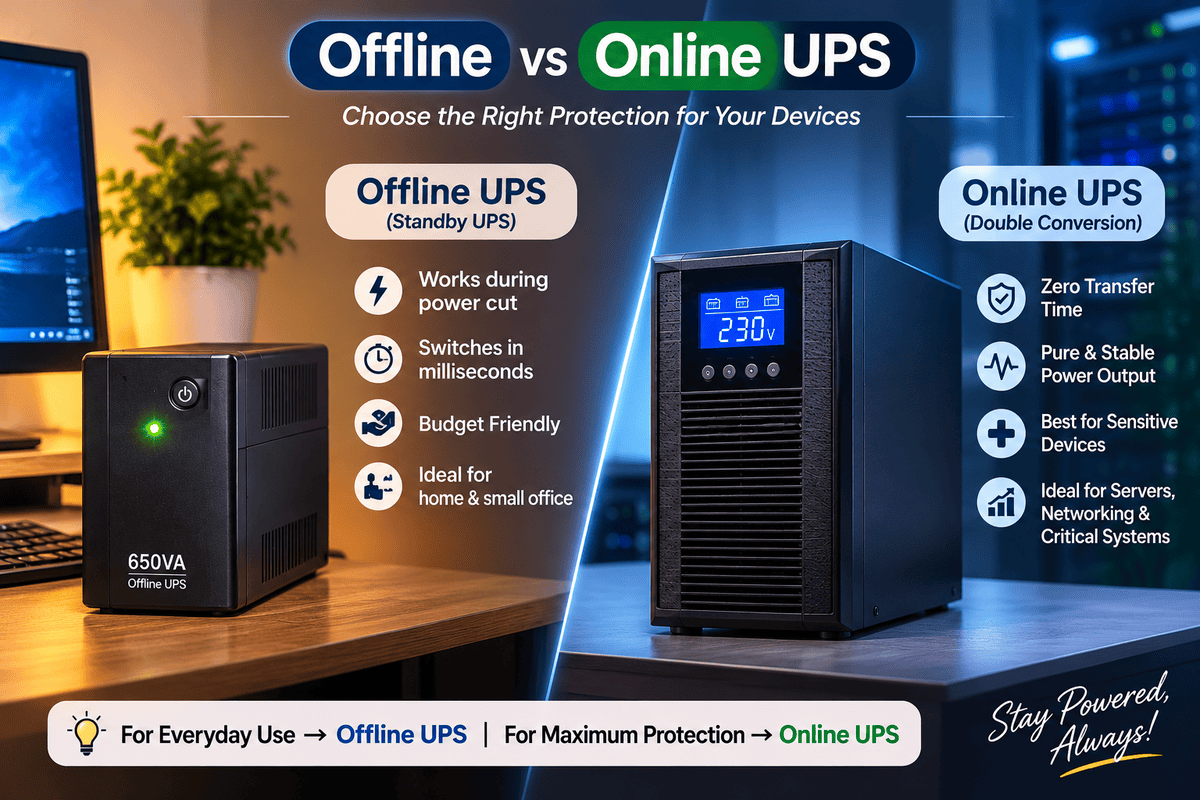
Offline UPS (standby): simple and affordable
An offline UPS passes mains power straight to your equipment while it charges its battery in the background. When the power fails, it switches to battery. That switch takes a few milliseconds, which modern computers and routers normally handle without restarting.
Strengths
- Lowest cost per unit
- Small, light and easy to install
- Perfectly adequate for most desktop computers, routers and general office use
Limits
- Does not clean up poor-quality power such as sags and fluctuations as thoroughly as an online unit
- Not ideal for sensitive or critical equipment
- Runtime is short unless you add a larger battery setup
Examples to consider:
- Power Pac 650VA Offline UPS
- Prolink 650VA Offline UPS
- Digital-X 650VA Offline UPS
- Prolink 1200VA Offline UPS
- Digital-X 1200VA Offline UPS
- Apollo 1200VA Offline UPS
- ZKTeco ZKUPS 1500VA / 900W Offline UPS
- ZKTeco ZKUPS 2000VA / 1200W UPS

Online UPS (double conversion): maximum protection
An online UPS constantly converts incoming power to DC and back to clean AC, so your equipment is always running from the inverter. If the mains fails there is no switching at all, which is why it is called zero transfer time. It also smooths out voltage swings and noise.
Strengths
- Zero interruption when the power drops
- Clean, stable output even when the mains is unreliable
- Best choice for servers, network cores, medical and lab equipment
Limits
- Higher purchase price
- Larger and heavier, and the unit runs warmer
- Uses slightly more electricity because it is always converting power
Examples to consider:
VA vs watts: the number most buyers get wrong
A UPS has two ratings: VA (volt-amps) and watts. Your equipment's load must fit within the watt rating, not the VA rating. Look at the ZKTeco units above: one is labelled 1500VA but its usable output is 900W, and the 2000VA model delivers 1200W.
Quick sizing method:
- List every device you will connect and note its wattage (check the label or power adapter).
- Add the watts together.
- Add about 30% headroom so the UPS isn't running at its limit and has room for growth.
- Choose a UPS whose watt rating is at or above that number.
Example: a desktop PC (about 200W), a monitor (30W) and a router (10W) total roughly 240W. With headroom you need about 310W, so a 650VA unit is the minimum and a 1200VA model gives comfortable margin and longer runtime.
Which one do you need? Quick guide
Your situation | Best choice |
|---|---|
1–2 desktop PCs, router, home office | Offline UPS, 650VA–1200VA |
Retail counter with POS printer and scanner | Offline UPS, 1200VA+ |
Small office with 5–10 workstations | Several offline UPS units, or one online UPS |
Server, NAS, or network core | Online UPS |
Medical, lab or precision equipment | Online UPS |
Router and CCTV only | Compact DC mini-UPS |
Long outages, many devices, no noise | Lithium power station |
Running a shop? Pair your UPS with our POS hardware such as the Epson TM-T81III receipt printer and Zebra DS2208 barcode scanner so a power cut never freezes a sale.
When a standard UPS isn't enough
A typical UPS gives minutes of backup, not hours. For longer outages you have two good options.
1. Lithium power stations. These carry far more energy, run quietly, and can support multiple devices for longer than a conventional UPS.
2. Router mini DC UPS. If all you need is internet and cameras during load-shedding, a compact DC unit is the cheapest, most efficient fix.
- Marsriva ET1 8000mAh
- Marsriva ET3 8400mAh
- Marsriva KP4 10000mAh
- Marsriva KP4 Max 20000mAh
- BD-PON Mini UPS 10400mAh
For a longer-term answer to rising electricity costs and outages, consider a hybrid solar system. See our Hybrid Solar Inverter category or try the Solar Package Finder.
Protect your CCTV and access control too
Security equipment is only useful if it stays on. A recorder that loses power mid-write can corrupt footage. Put your NVR or DVR on a UPS, and don't forget the PoE switch feeding your cameras. Explore our Security System category and the ZKTeco biometric attendance terminals that also need steady power.
Five habits that make a UPS last longer
- Never plug a laser printer, heater, AC or fridge into a standard UPS. They draw heavy surge current.
- Keep it ventilated and away from direct sunlight and damp walls.
- Test it every month by unplugging from the wall for a few seconds.
- Expect to replace the battery every few years, sooner in hot conditions.
- Don't overload it. Stay within roughly 70% of the rated watts.
Frequently asked questions
Can I use an offline UPS for a computer? Yes. Offline UPS units are the standard choice for desktop computers, routers and general office equipment.
Is an online UPS worth the extra cost? Only if your equipment is critical, sensitive, or the mains in your area is very unstable. For ordinary offices, a good offline UPS is usually enough.
How long will my UPS run? That depends on your load and battery size. A small load on a 1200VA unit may last far longer than a full desktop setup. For long outages, choose a lithium power station or add solar.
Can a UPS power an air conditioner? No. Standard UPS units are not designed for ACs, fridges or motors. Use a suitable inverter or solar system instead.
Need help choosing?
Tell us what you plan to connect and our team will recommend the right size and type.
- Contact us
- How to order · Order & payment
- Warranty policy · Service center · Premium service
- Visit a branch · FAQ