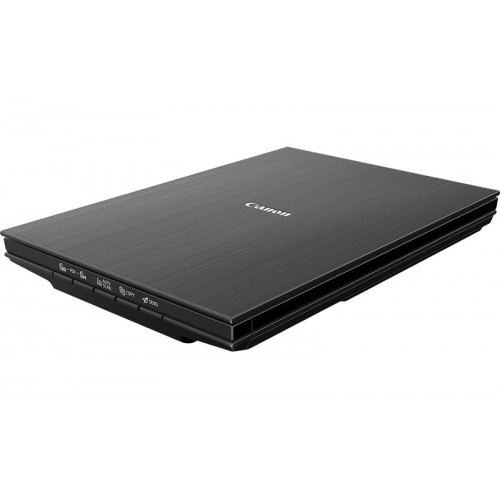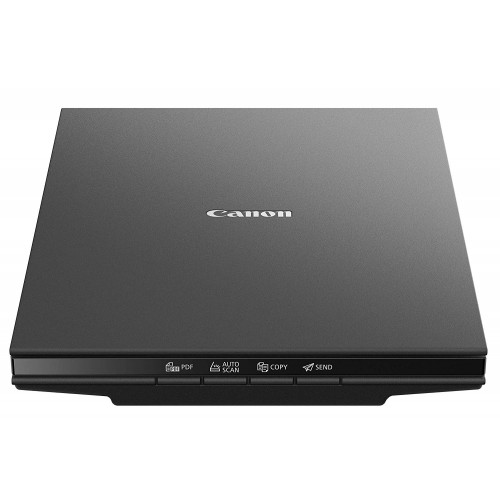


Canon CanoScan LiDE 300 Flatbed Scanner
Exclusive of all taxes
Product Details
Key Features
Compact and Affordable: The Canon CanoScan LiDE 300 Flatbed Scanner is a lightweight scanner perfect for straightforward scanning at the touch of a button.
Sleek and Affordable for Home or Office: With a sleek, compact and stylish design, this lightweight A4 flatbed scanner is fitted with 4 EZ operation buttons for easy use and hassle-free scanning.
Compact Design & Classy Look: Slender, stylish and weighing just 1.7kg, CanoScan LiDE 300 is an affordable space-saving solution.
Easy Operation: Take the hassle out of scanning thanks to the 4 EZ operation buttons, which take you straight to Auto Scan, copy, email and PDF.
Quick Response: Scanning takes no time at all with CanoScan LiDE 300. It takes approximately 10 seconds to get a 300 dpi A4 scan, saving you precious time and maximising efficiency.
High-Resolution Scanning: Perfect for high-resolution scanning at home or in the office.
Power Efficient: No power output is needed either - just use your PC or laptop's USB connection.
Space-Saving Solution: An affordable space-saving solution for your home or office.
Easy to Use: Easy to use with 4 EZ operation buttons.
Fast Scanning: Fast scanning with approximate 10 seconds to get a 300 dpi A4 scan.
Flatbed Scanner | Resolution |
Resolution | 2400 x 2400dpi |
Interface | USB 2.0 High-Speed Mini-B |
Speed (colour) (Reflective) | 14.8msec/line (2400 dpi) |
Speed (colour) (Reflective) (1200 dpi) | 6.6msec/line |
Speed (colour) (Reflective) (600 dpi) | 3.8msec/line |
Speed (colour) (Reflective) (300 dpi) | 2.2msec/line |
Speed (greyscale, B&W) (Reflective) (2400 dpi) | 4.3msec/line |
Speed (greyscale, B&W) (Reflective) (1200 dpi) | 2.2msec/line |
Speed (greyscale, B&W) (Reflective) (600 dpi) | 1.3msec/line |
Speed (greyscale, B&W) (Reflective) (300 dpi) | 2.2msec/line |
Dimensions | 250 x 367 x 42 mm |
Weight | 1.7 Kg |
Color | Black |
Description
Canon CanoScan LiDE 300 Flatbed Scanner
Key Features & Benefits:
- Compact and Affordable: The Canon CanoScan LiDE 300 Flatbed Scanner is a lightweight scanner perfect for straightforward scanning at the touch of a button.
- Sleek and Affordable for Home or Office: With a sleek, compact and stylish design, this lightweight A4 flatbed scanner is fitted with 4 EZ operation buttons for easy use and hassle-free scanning.
- Compact Design & Classy Look: Slender, stylish and weighing just 1.7kg, CanoScan LiDE 300 is an affordable space-saving solution.
- Easy Operation: Take the hassle out of scanning thanks to the 4 EZ operation buttons, which take you straight to Auto Scan, copy, email and PDF.
- Quick Response: Scanning takes no time at all with CanoScan LiDE 300. It takes approximately 10 seconds to get a 300 dpi A4 scan, saving you precious time and maximising efficiency.
- High-Resolution Scanning: Perfect for high-resolution scanning at home or in the office.
- Power Efficient: No power output is needed either - just use your PC or laptop's USB connection.
- Space-Saving Solution: An affordable space-saving solution for your home or office.
- Easy to Use: Easy to use with 4 EZ operation buttons.
- Fast Scanning: Fast scanning with approximate 10 seconds to get a 300 dpi A4 scan.
Ideal For:
- Home users
- Office workers
- Students
- Professionals
- Business owners
- Photographers
- Graphic designers
- Researchers
Summary:
The Canon CanoScan LiDE 300 Flatbed Scanner is a compact and affordable scanner perfect for high-resolution scanning at home or in the office. It features a sleek and stylish design with 4 EZ operation buttons for easy use. Weighing just 1.7kg, it is a space-saving solution for your home or office. Available at Revolution Technology BD, this scanner is ideal for home users, office workers, students, professionals, business owners, photographers, graphic designers, and researchers.
How to Order
Revolution Technology BD has made shopping easier for customers. Follow these steps:
- Click Register Button from home page
- Register with: Name + Email + Mobile + Password
- Click Create Account after entering information
- Login automatically or use Login button
- Provide mobile number and password, then Sign Up
- Choose desired product and click Buy Now
- View product details and click Add to Cart
- Click Item box (upper right corner)
- Go to Shopping Cart page
- Continue Shopping for more products or proceed
- Click "Click Here to Address" button
- Provide Full Name, Phone, Email & Delivery Address
- Click Order Submit button
- View Bill Invoice and receive email confirmation
- Print Invoice using Print button
- Wait for delivery - we'll keep you updated
- Thank you for shopping with us!