

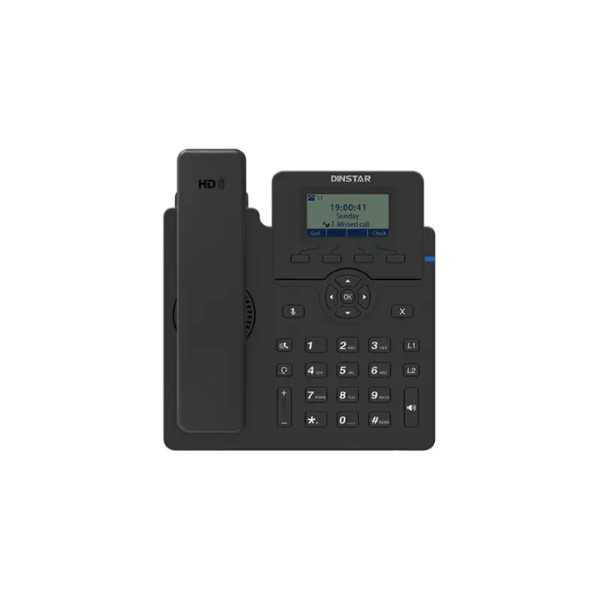
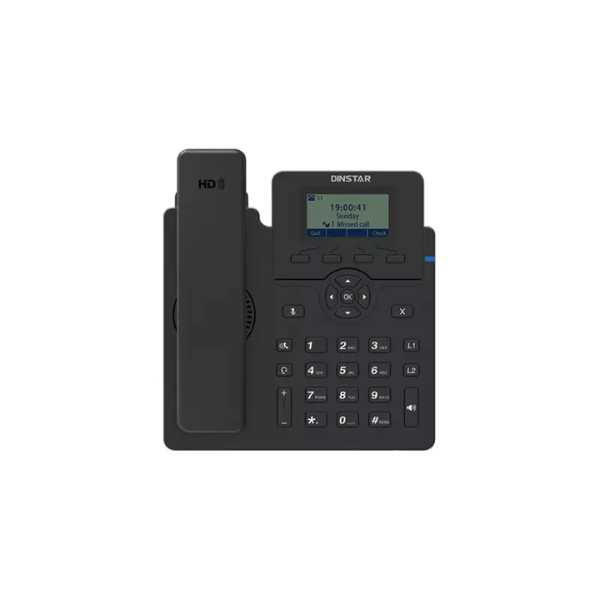
DINSTAR C60SP Entry Level IP Phone with POE & With Adapter
Exclusive of all taxes
Product Details
KEY FEATURES
Display:
2.3" 132x64 pixel graphical LCD
SIP Accounts: 2
SIP accounts with 2 line keys
Conference:
5-way conference calling
Voice: HD voice
with full-duplex speakerphone
Network:
Dual-port 10/100Mbps Ethernet ports (LAN & PC)
Power: PoE
(IEEE 802.3af) support with included power adapter
Phonebook: Up
to 1000 groups contacts
Call Features:
Call hold, transfer, forward, mute, DND, speed dial
Headset
Support: RJ9 headset port with EHS support for wireless headsets
Mounting: Wall
mountable with adjustable stand
Warranty: 2 Years
SPECIFICATION
|
Feature |
Specification |
|
Brand |
DINSTAR |
|
Model |
C60SP |
|
Type |
Entry
Level SIP IP Phone |
|
Display |
2.3"
132x64 pixel graphical LCD |
|
SIP
Accounts |
2 |
|
Line
Keys |
2 |
|
Network
Interface |
2 x RJ45
10/100Mbps Ethernet Ports (LAN + PC) |
|
PoE
Support |
Yes (IEEE
802.3af) |
|
Power
Supply |
5V DC
adapter (included) or PoE |
|
Voice
Codecs |
G.722,
OPUS-WB (wideband), G.711a/u, G.723, G.726, G.729A/B, AMR, iLBC |
|
Audio
Features |
HD Voice,
Full-duplex speakerphone, Echo cancellation, VAD, CNG |
|
Conference
Call |
5-way
Conference |
|
Phonebook |
Up to 1000
groups |
|
Blacklist |
100 groups |
|
Call
Log |
100 logs |
|
Remote
Phonebook |
Support up
to 5 remote phonebook URLs |
|
Headset
Port |
RJ9 (4P4C) |
|
Handset
Port |
RJ9 (4P4C) |
|
EHS
Support |
Yes
(Plantronics, Jabra, Sennheiser wireless headsets) |
|
Protocols |
SIP v1
(RFC2543), v2 (RFC3261), SIP over TLS, SRTP, TCP/UDP, RTP/RTCP, DHCP, DNS,
STUN, LLDP, OpenVPN, 802.1X |
|
Management |
Auto
provisioning via FTP/TFTP/HTTP/HTTPS/PnP, Web-based management, SNMP, TR069,
Syslog |
|
Features |
XML
Browser, Action URL/URI, Keyboard lock, Multiple languages, LDAP |
|
Wall
Mount |
Yes |
|
Stand |
Dual-angle
adjustable (40° and 45°) |
|
Color |
Black |
|
Dimensions |
180 x 192
x 36 mm (without foot stand) |
|
Weight |
370g
(device), 60g (foot stand) |
|
Operating
Temperature |
0~40°C |
|
Operating
Humidity |
10% to 95%
(non-condensing) |
|
Warranty |
2 Years |
DESCRIPTION
DINSTAR
C60SP Entry Level IP Phone with POE & With Adapter
The DINSTAR
C60SP is an entry-level SIP-based IP phone designed to deliver reliable and
cost-effective VoIP communication for small businesses, offices, call centers,
and remote workers . Built on cutting-edge SIP technology, this phone
offers essential telephony features with exceptional voice quality and easy
deployment .
Display and
User Interface: The
C60SP features a 2.3-inch 132x64 pixel graphical LCD display that provides an
elegant and intuitive user interface . The clear display shows caller
information, call duration, and menu options at a glance, making navigation
simple and user-friendly .
Superior
Voice Quality: Equipped
with HD voice technology, the C60SP ensures crystal-clear conversations with
wideband audio codec support including G.722 and OPUS-WB . The full-duplex
speakerphone system and Digital Signal Processor (DSP) deliver exceptional
audio quality whether using the hands-free speakerphone or the handset .
Flexible
Connectivity: The
phone features dual-port 10/100Mbps Ethernet ports (LAN and PC), allowing users
to connect a computer directly through the phone, reducing cable clutter and
simplifying desk setup . This design is particularly valuable in offices
with limited network ports .
Power
Options: The C60SP
supports both Power over Ethernet (PoE) IEEE 802.3af and comes with an included
power adapter, offering maximum installation flexibility . It can be
powered directly through the network cable or via the adapter, making it
suitable for diverse network environments .
Call
Features: Supporting
2 SIP accounts with 2 line keys, the C60SP enables users to manage multiple
lines or extensions efficiently . Key calling features include 5-way
conference calling, call waiting, call forward, blind/attendant transfer, call
hold, mute, Do Not Disturb (DND) mode, speed dialing, hotline, redial,
auto-redial, and auto-answer .
Phonebook
and Storage: The
phonebook can store up to 1000 groups of contacts, while the blacklist holds
100 groups of blocked numbers . The call log keeps a record of 100
previous calls, and the phone supports up to 5 remote phonebook URLs via
LDAP .
Compatibility: Based on RFC3261, the C60SP has
been tested for compatibility with leading IP telephony systems and
equipment . It supports Dinstar UC/IPPBX products and third-party
platforms such as 3CX, Asterisk, Yeastar, Xorcom, VoIP.ms, Broadsoft, and
FreeSWITCH .
Advanced
Management: The
phone offers multiple management options including auto provisioning via
FTP/TFTP/HTTP/HTTPS/PnP, web-based configuration, SNMP, TR069, and Syslog
support . Firmware upgrades can be performed easily through the web
interface .
Ergonomic
Design: The C60SP
features a sturdy build with an ergonomic handset for comfortable long-term
use . It includes a dual-angle adjustable stand (40° and 45°) and is
wall-mountable, offering flexible placement options .
Security: The phone supports advanced
security features including SIP over TLS, SRTP encryption, OpenVPN, and 802.1X
authentication, ensuring secure communication in business environments .
The DINSTAR
C60SP delivers professional-grade features at an entry-level price point,
making it an ideal choice for organizations looking to implement or expand
their VoIP infrastructure with reliable, easy-to-use IP phones . Backed by
a 2-year warranty, this phone offers exceptional value and long-term
reliability for business communication needs .
How to Order
Revolution Technology BD has made shopping easier for customers. Follow these steps:
- Click Register Button from home page
- Register with: Name + Email + Mobile + Password
- Click Create Account after entering information
- Login automatically or use Login button
- Provide mobile number and password, then Sign Up
- Choose desired product and click Buy Now
- View product details and click Add to Cart
- Click Item box (upper right corner)
- Go to Shopping Cart page
- Continue Shopping for more products or proceed
- Click "Click Here to Address" button
- Provide Full Name, Phone, Email & Delivery Address
- Click Order Submit button
- View Bill Invoice and receive email confirmation
- Print Invoice using Print button
- Wait for delivery - we'll keep you updated
- Thank you for shopping with us!



