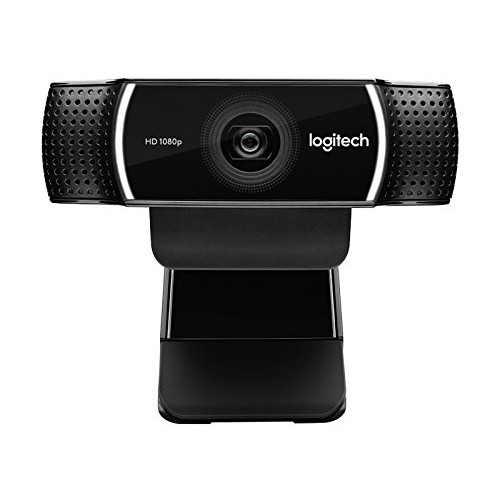

Logitech C922 Pro Full HD Webcam
Exclusive of all taxes
Product Details
Key Features
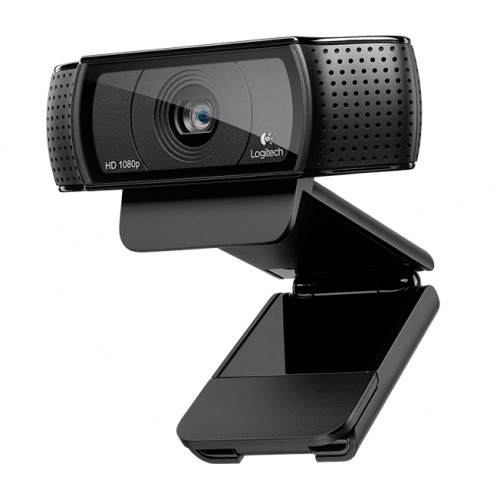
Capture life-like video: With 1080p resolution at 30fps, the Logitech C922 Pro Full HD Webcam captures smooth and detailed video.
Wide-angle lens: The webcam's wide-angle lens allows for a wider field of view, making it perfect for capturing group shots.
Built-in microphone: The Logitech C922 Pro Full HD Webcam features a built-in microphone, ensuring clear and crisp audio.
Works with popular streaming software: The webcam is compatible with popular streaming software like XSplit and OBS.
Durable design: The webcam's durable design ensures it can withstand regular use.
Easy to use: The Logitech C922 Pro Full HD Webcam is easy to set up and use, making it perfect for beginners.
High-quality video: The webcam's high-quality video makes it perfect for streaming, video conferencing, and more.
Adjustable clip: The webcam's adjustable clip allows for easy installation on any monitor or laptop screen.
Warranty: The Logitech C922 Pro Full HD Webcam comes with a 2-year warranty, providing peace of mind for customers.
Compact design: The webcam's compact design makes it perfect for taking on the go.
Plug and play: The Logitech C922 Pro Full HD Webcam is plug and play, making it easy to use right out of the box.
Height | 1.14 in (29 mm) |
Width | 3.74 in (95 mm) |
Depth | 0.94 in (24 mm) |
Weight including clip and cable | 5.71 oz (162 g) |
Cable length | 6 ft (1.8 m) |
Compatibility | Windows 7, Windows 8, or Windows 10, Mac OS X 10.9 or higher, Chrome OS, Android v5.0 or above |
Description
Logitech C922 Pro Full HD Webcam
Key Features & Benefits:
- Capture life-like video: With 1080p resolution at 30fps, the Logitech C922 Pro Full HD Webcam captures smooth and detailed video.
- Wide-angle lens: The webcam's wide-angle lens allows for a wider field of view, making it perfect for capturing group shots.
- Built-in microphone: The Logitech C922 Pro Full HD Webcam features a built-in microphone, ensuring clear and crisp audio.
- Works with popular streaming software: The webcam is compatible with popular streaming software like XSplit and OBS.
- Durable design: The webcam's durable design ensures it can withstand regular use.
- Easy to use: The Logitech C922 Pro Full HD Webcam is easy to set up and use, making it perfect for beginners.
- High-quality video: The webcam's high-quality video makes it perfect for streaming, video conferencing, and more.
- Adjustable clip: The webcam's adjustable clip allows for easy installation on any monitor or laptop screen.
- Warranty: The Logitech C922 Pro Full HD Webcam comes with a 2-year warranty, providing peace of mind for customers.
- Compact design: The webcam's compact design makes it perfect for taking on the go.
- Plug and play: The Logitech C922 Pro Full HD Webcam is plug and play, making it easy to use right out of the box.
Ideal For:
- Gamers who want to stream high-quality video to their audience
- Business professionals who need a reliable webcam for video conferencing
- YouTubers who want to capture high-quality video for their channel
- Students who need a webcam for online classes
- Content creators who want to stream high-quality video to their audience
- Anyone who wants a high-quality webcam for personal or professional use
Summary:
The Logitech C922 Pro Full HD Webcam is a high-quality webcam perfect for streaming, video conferencing, and more. With its 1080p resolution, wide-angle lens, and built-in microphone, this webcam captures smooth and detailed video and clear audio. The Logitech C922 Pro Full HD Webcam is easy to set up and use, making it perfect for beginners. Available at Revolution Technology BD, this webcam is a great addition to any home or office setup.
How to Order
Revolution Technology BD has made shopping easier for customers. Follow these steps:
- Click Register Button from home page
- Register with: Name + Email + Mobile + Password
- Click Create Account after entering information
- Login automatically or use Login button
- Provide mobile number and password, then Sign Up
- Choose desired product and click Buy Now
- View product details and click Add to Cart
- Click Item box (upper right corner)
- Go to Shopping Cart page
- Continue Shopping for more products or proceed
- Click "Click Here to Address" button
- Provide Full Name, Phone, Email & Delivery Address
- Click Order Submit button
- View Bill Invoice and receive email confirmation
- Print Invoice using Print button
- Wait for delivery - we'll keep you updated
- Thank you for shopping with us!