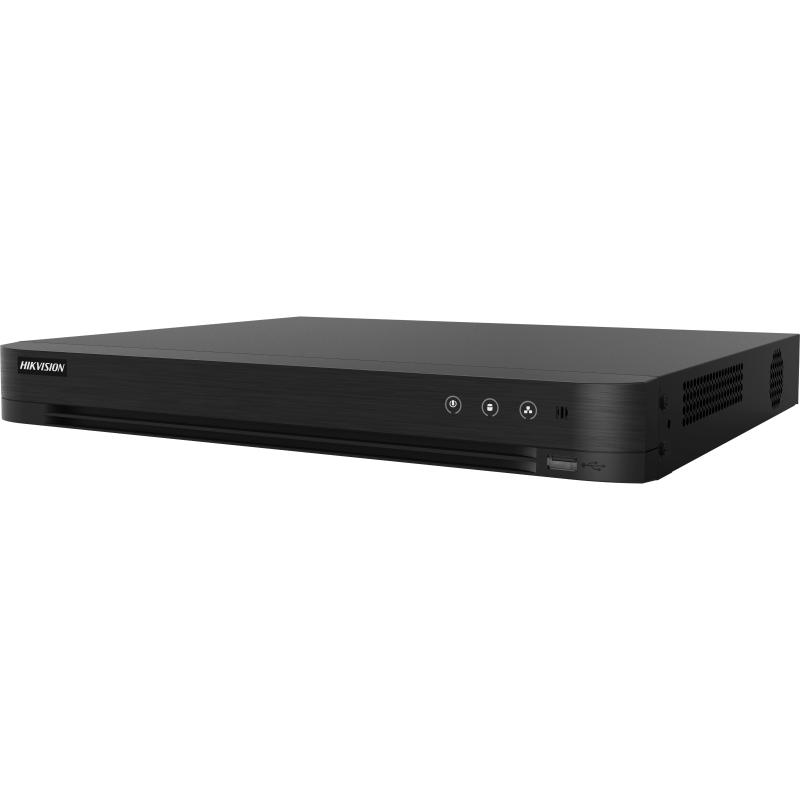
Hikvision iDS-7216HQHI-M2/XT 16 Channel AcuSense DVR
Exclusive of all taxes
Product Details
Key Features
Enhanced Security with Deep Learning: The Hikvision iDS-7216HQHI-M2/XT 16 Channel AcuSense DVR features advanced deep learning-based motion detection for enhanced security and reduced false alarms.
4K Resolution and High Frame Rate: With support for 4K resolution and up to 30fps frame rate, this DVR provides clear and smooth video playback.
H.265 Pro+ Video Compression: The Hikvision iDS-7216HQHI-M2/XT 16 Channel AcuSense DVR supports H.265 Pro+ video compression, reducing storage requirements and improving video quality.
Facial Detection and Capture: This DVR features facial detection and capture capabilities, allowing for easy identification of individuals and enhanced security.
Wide Range of Video Inputs and Outputs: With support for up to 24-ch IP video input and multiple video output options, this DVR is ideal for large-scale surveillance systems.
Dual-stream and Audio Compression: The Hikvision iDS-7216HQHI-M2/XT 16 Channel AcuSense DVR supports dual-stream and audio compression, reducing bandwidth requirements and improving overall system performance.
RS-485 and USB Interfaces: This DVR features RS-485 and USB interfaces, allowing for easy connectivity and configuration.
Power Efficiency and Reliability: The Hikvision iDS-7216HQHI-M2/XT 16 Channel AcuSense DVR is designed for power efficiency and reliability, with a low power consumption of ≤40 W.
Wide Operating Temperature Range: This DVR operates within a wide temperature range of -10 °C to 55 °C, making it suitable for use in various environments.
High Storage Capacity and Expandability: With support for up to 12 TB per disk, this DVR offers high storage capacity and expandability, allowing for easy storage of large amounts of video data.
Advanced Network Capabilities: The Hikvision iDS-7216HQHI-M2/XT 16 Channel AcuSense DVR features advanced network capabilities, including TCP/IP, PPPoE, DHCP, and Hik-Connect.
User-Friendly Interface and Configuration: This DVR features a user-friendly interface and configuration options, making it easy to set up and manage surveillance systems.
Face Picture Libraries | Up to 16 |
Face Picture Backup | HDD and flash backup |
Face Comparison Alarm | 4-ch (HD analog camera) |
Motion Detection | Deep learning-based Motion Detection 2.0 |
Object Classification | Human and Vehicle |
Perimeter Protection | Up to 8-ch (advanced model) |
Facial Detection & Capture | 4-ch |
IP Video Input | 8-ch (up to 24-ch), each up to 6MP |
Analog Video Input | 16-ch BNC |
HDMI Output | 1-ch, 4K (3840 × 2160)/30Hz |
CVBS Output | 1-ch, PAL: 704 × 576, NTSC: 704 × 480 |
VGA Output | 1-ch, 1920 × 1080/60Hz |
Video Output Mode | HDMI/VGA simultaneous output |
Audio Output | 1-ch RCA |
Audio Input | 1-ch (up to 16-ch optional) RCA |
Two-Way Audio | 1-ch RCA (using first audio input) |
Video Compression | H.265 Pro+/H.265 Pro/H.265/H.264+/H.264 |
Max Encoding Resolution | 3K/5MP/4MP/1080p |
Max Frame Rate (Main Stream) | Up to 30fps (dependent on resolution) |
Video Bitrate | 32 Kbps to 6 Mbps |
Dual-stream | Supported |
Audio Compression | G.711u |
Audio Bitrate | 64 Kbps |
Decoding Capability | Up to 24-ch 1080P@30fps |
Total Network Bandwidth | 256 Mbps |
Network Protocol | TCP/IP, PPPoE, DHCP, Hik-Connect, ONVIF, etc. |
Remote Connections | 128 |
Network Interface | 1x RJ45 10/100/1000 Mbps |
SATA Interfaces | 2 |
Max SATA Capacity | 12 TB per disk |
Serial Interface | RS-485 (half-duplex) |
USB Interfaces | Front: 1x USB 2.0; Rear: 2x USB 3.0 |
Alarm In/Out | Optional |
Power Supply | 12 VDC, 3.3 A |
Power Consumption | ≤40 W |
Operating Temperature | -10 °C to 55 °C (14 °F to 131 °F) |
Operating Humidity | 10% to 90% |
Dimensions (W x D x H) | 384 × 317 × 52 mm (15.1 × 12.5 × 2.0 inch) |
Weight | ≤2 kg (4.4 lb) |
Description
Hikvision iDS-7216HQHI-M2/XT 16 Channel AcuSense DVR
Key Features & Benefits:
- Enhanced Security with Deep Learning: The Hikvision iDS-7216HQHI-M2/XT 16 Channel AcuSense DVR features advanced deep learning-based motion detection for enhanced security and reduced false alarms.
- 4K Resolution and High Frame Rate: With support for 4K resolution and up to 30fps frame rate, this DVR provides clear and smooth video playback.
- H.265 Pro+ Video Compression: The Hikvision iDS-7216HQHI-M2/XT 16 Channel AcuSense DVR supports H.265 Pro+ video compression, reducing storage requirements and improving video quality.
- Facial Detection and Capture: This DVR features facial detection and capture capabilities, allowing for easy identification of individuals and enhanced security.
- Wide Range of Video Inputs and Outputs: With support for up to 24-ch IP video input and multiple video output options, this DVR is ideal for large-scale surveillance systems.
- Dual-stream and Audio Compression: The Hikvision iDS-7216HQHI-M2/XT 16 Channel AcuSense DVR supports dual-stream and audio compression, reducing bandwidth requirements and improving overall system performance.
- RS-485 and USB Interfaces: This DVR features RS-485 and USB interfaces, allowing for easy connectivity and configuration.
- Power Efficiency and Reliability: The Hikvision iDS-7216HQHI-M2/XT 16 Channel AcuSense DVR is designed for power efficiency and reliability, with a low power consumption of ≤40 W.
- Wide Operating Temperature Range: This DVR operates within a wide temperature range of -10 °C to 55 °C, making it suitable for use in various environments.
- High Storage Capacity and Expandability: With support for up to 12 TB per disk, this DVR offers high storage capacity and expandability, allowing for easy storage of large amounts of video data.
- Advanced Network Capabilities: The Hikvision iDS-7216HQHI-M2/XT 16 Channel AcuSense DVR features advanced network capabilities, including TCP/IP, PPPoE, DHCP, and Hik-Connect.
- User-Friendly Interface and Configuration: This DVR features a user-friendly interface and configuration options, making it easy to set up and manage surveillance systems.
Ideal For:
- Security professionals and system integrators
- Business owners and managers
- Facility administrators and managers
- Law enforcement agencies and government organizations
- Retail and commercial establishments
- Industrial and manufacturing facilities
- Transportation and logistics companies
- Schools and educational institutions
- Hospitals and healthcare facilities
Summary:
The Hikvision iDS-7216HQHI-M2/XT 16 Channel AcuSense DVR is a high-performance surveillance system designed for large-scale security applications. With its advanced deep learning-based motion detection, 4K resolution, and H.265 Pro+ video compression, this DVR provides enhanced security and reduced storage requirements. Revolution Technology BD offers this product for purchase, ideal for security professionals, business owners, and facility administrators seeking a reliable and user-friendly surveillance solution.
How to Order
Revolution Technology BD has made shopping easier for customers. Follow these steps:
- Click Register Button from home page
- Register with: Name + Email + Mobile + Password
- Click Create Account after entering information
- Login automatically or use Login button
- Provide mobile number and password, then Sign Up
- Choose desired product and click Buy Now
- View product details and click Add to Cart
- Click Item box (upper right corner)
- Go to Shopping Cart page
- Continue Shopping for more products or proceed
- Click "Click Here to Address" button
- Provide Full Name, Phone, Email & Delivery Address
- Click Order Submit button
- View Bill Invoice and receive email confirmation
- Print Invoice using Print button
- Wait for delivery - we'll keep you updated
- Thank you for shopping with us!